This checklist is for homeowners who want a clearer view of how their backup power system and home energy equipment are operating. It covers monitoring tools for whole-home energy, individual circuits, batteries, power quality, temperature, and plug-in loads.

Get backup power and energy gear delivered free with Prime
- Fast, free delivery on millions of items
- Prime Video, Amazon Music and more included
- Member-only deals all year
The sections move from broad system visibility to more focused checks. Some slots include a named product; others offer selection advice without a specific pick. Use each section to identify what you need to observe and whether the suggested device fits your setup.
Before choosing, note your system’s voltage, phase, current capacity, and connection options. Compare those details with the device’s stated compatibility, and consider where sensors or monitors can be installed and accessed. When electrical installation is involved, have a qualified professional confirm the fit.
Whole-Home Energy Monitor
A whole-home monitor can help you see energy use across the electrical system, which is useful when you want to understand how household loads relate to backup power. The Eyedro 3-Phase Energy Monitor 200A/600V (Model EB6-EW-E3) – WiFi/Ether is the named pick for this slot. Its product name identifies a three-phase monitor and lists 200A/600V, so confirming your service details is an essential first step. Match the electrical configuration before considering installation or connectivity. A common mistake is choosing a monitor because its headline capacity appears sufficient while overlooking phase or voltage differences. Check the product documentation and confirm that the model supports your panel and the way you plan to view readings. The name mentions WiFi/Ether, but verify which connection method is available for your installation and network. Also consider sensor placement, access to the panel, and whether the data will remain useful when your backup system is running. Confirm compatibility with your electrician if you are unsure about the service configuration or installation requirements. A monitor is most useful when it covers the loads and operating conditions you actually want to observe.What to look for:
- Confirm your system is three-phase before selecting this model.
- Compare service voltage and current capacity with the monitor’s stated 200A/600V specifications.
- Check the manufacturer’s documentation for supported connection options and network requirements.
- Verify sensor and panel installation requirements with a qualified electrician.
- Decide which whole-home loads and backup operating conditions you want to track.
Eyedro 3-Phase Energy Monitor 200A/600V (Model EB6-EW-E3) – WiFi/Ethernet, Real-
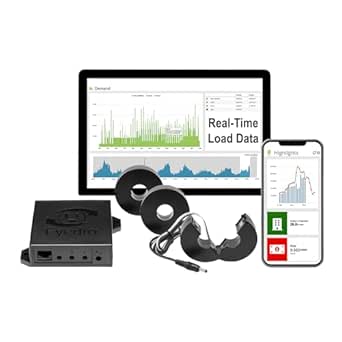
The Eyedro EB6-EW-E3 is a 3-phase energy meter with real-time monitoring of kWh, Watts, Amps, Volts, Power Factor, and cost. It installs non-invasively with split-core CT sensors (3x200A included), connects via 2.4 GHz WiFi or Ethernet, and supports solar/net metering with direction detection.
Pros:
- Non-invasive installation with split-core CT sensors — no wiring changes or special tools required
- Free cloud software with 24/7 data history, alerts, reports, and bill projections — no subscription fees
- Solar and net metering ready, differentiating generated vs. consumed power
- Dual connectivity options via 2.4 GHz WiFi or wired Ethernet
Cons:
- Full net metering with solar breakout requires a second EB6-EW-E3 unit
- European-style power adapter sold separately
- Setup requires configuration in the MyEyedro cloud platform
Best for: Homeowners whose electrical service matches the listed three-phase, 200A/600V specifications.
Not ideal for: Setups whose phase, voltage, or current requirements do not match the model.
Bottom line: Confirm the electrical fit and connection details before choosing this whole-home monitor.
Smart Circuit Monitor
A smart circuit monitor focuses attention on selected circuits, which can make it easier to follow the loads that matter most during backup operation. Since this slot has no named product, begin by listing the circuits you need to observe, such as critical household loads or circuits whose behavior you want to understand. Choose coverage based on your priorities, rather than assuming one monitor will automatically cover every circuit. A frequent buying mistake is overlooking panel layout, circuit count, or compatibility with the existing electrical system. Check how many circuits a candidate device can monitor and whether its sensing method suits your panel. Confirm how readings are communicated and displayed, and whether the monitor provides the information you expect for your backup setup. Consider installation access and sensor fit before ordering; panel designs and available space can vary. If circuit identification or installation is uncertain, ask a qualified electrician to assess the panel and the monitor’s documentation. Keep the scope specific: choose monitoring coverage that answers a real question about your system, and verify compatibility before committing.What to look for:
- Count the circuits you want to monitor and confirm device capacity.
- Check panel compatibility and sensor placement requirements.
- Verify the monitoring method and how readings are accessed.
- Prioritize circuits relevant to backup operation or energy management.
- Ask an electrician to confirm fit and installation requirements when needed.
Battery Monitor Shunt
A battery monitor shunt is intended to provide information about a battery system, making it relevant when you want to follow battery behavior as part of backup power monitoring. The named pick is the LiTime 500A Bluetooth Battery Monitor for 8V-120V Systems. Its product name gives a current and voltage range, but those figures alone do not establish fit for every battery bank or installation. Check the battery system specifications and the manufacturer’s instructions before selecting it. A common mistake is comparing only voltage while missing current capacity, battery configuration, or installation requirements for the shunt. Confirm that the system falls within the listed 8V-120V range and that the expected current is compatible with the stated 500A rating. Check the documentation for supported battery types, wiring, shunt placement, and Bluetooth access requirements. Consider whether the monitor can be installed where it can measure the intended battery circuit, and whether the monitoring device can communicate from the location where you will use it. Verify the full setup against the manual; consult a qualified installer if you are uncertain about wiring or placement.What to look for:
- Confirm system voltage is within the listed 8V-120V range.
- Check expected current against the stated 500A rating.
- Verify battery type and configuration support in the manufacturer’s documentation.
- Review shunt wiring, placement, and installation requirements.
- Confirm Bluetooth access works for your intended monitoring location.
LiTime 500A Bluetooth Battery Monitor for 8V-120V Systems

The LiTime 500A Bluetooth Battery Monitor allows real-time tracking of battery parameters via a mobile app, supporting various battery types and voltages. It offers customizable alerts, historical data analysis, and reliable protection features for RV, marine, and backup systems.
Pros:
- Real-time monitoring via mobile app
- Supports multiple battery types and voltages
- Customizable alerts for early issue detection
- Provides historical data for performance analysis
Cons:
- Requires smartphone app for full functionality
- Limited to 1-year warranty
Best for: Battery setups that match the listed voltage and current specifications and need Bluetooth monitoring.
Not ideal for: Systems outside the stated range or installations that cannot meet the shunt requirements.
Bottom line: Use the manual to confirm battery, current, wiring, and Bluetooth compatibility.
Power Quality Analyzer
A power quality analyzer is a specialized choice for examining electrical supply behavior. The named pick is the Fluke 1775 Three-Phase Power Quality Analyzer. Its product name identifies a three-phase analyzer, so first establish whether your monitoring need and electrical system match that scope. This is a focused instrument, and the right choice depends on what you need to measure and how you will interpret the results. Define the measurement task before choosing an analyzer. A common mistake is selecting a technical analyzer without checking its measurement functions, setup requirements, or the expertise needed to use it. Review the manufacturer’s documentation for the parameters it measures, supported configurations, connections, and any accessories required for your task. Confirm that the analyzer suits the system you intend to assess, including its phase arrangement. Think about who will connect the equipment and interpret the readings; professional help may be appropriate for electrical measurements. Match instrument capability to the question you need answered, and avoid assuming that a three-phase label alone guarantees suitability for every power quality investigation. For a backup system assessment, clarify the measurement scope with a qualified technician before purchase.What to look for:
- Confirm your system and measurement task suit a three-phase analyzer.
- Review documented measurement functions and supported configurations.
- Check required connections, accessories, and setup instructions.
- Determine who will safely connect the analyzer and interpret its readings.
- Clarify the scope of any backup-system assessment with a qualified technician.
Fluke 1775 Three-Phase Power Quality Analyzer

The Fluke 1775 is a professional power quality analyzer designed for three-phase electrical systems. It helps technicians diagnose power issues and monitor system performance with advanced measurement capabilities.
Pros:
- Accurate three-phase power measurements
- Suitable for professional electrical diagnostics
- User-friendly interface
Cons:
- Limited detailed specifications available
- Potentially high cost for casual users
Best for: Users who need a documented power quality assessment on a compatible three-phase system.
Not ideal for: Homeowners seeking simple ongoing energy visibility without a defined analysis task.
Bottom line: Confirm the measurement scope and required expertise before choosing this analyzer.
Wireless Temperature Sensor
Temperature and humidity readings can add useful context when monitoring the spaces around home energy or backup equipment. The named pick is the Temp Stick Remote WiFi Temperature & Humidity Sensor, Data Logger, No . The product name identifies temperature and humidity sensing, WiFi, and data logging, though its ending is incomplete. Check the complete product listing to confirm the exact model and included features before purchase. A common mistake is focusing on wireless access without checking sensor placement, WiFi coverage, or the conditions the sensor is intended to measure. Decide which location you need to monitor and confirm that the device’s documented operating range is suitable for that space. Check how it connects to WiFi, how readings and logged data are accessed, and whether alerts are available if you need them. Do not assume that a sensor measures equipment temperatures directly or is designed for a particular environment unless the documentation says so. Place it for the conditions you want to observe, and confirm signal access from that location. If monitoring near electrical equipment, follow the product’s installation and placement guidance.What to look for:
- Confirm the complete model name and included features in the product listing.
- Check documented temperature and humidity operating ranges.
- Verify WiFi coverage at the intended sensor location.
- Review how readings and logged data are accessed.
- Confirm placement guidance and any documented alert features.
Temp Stick Remote WiFi Temperature & Humidity Sensor, Data Logger, No Subscripti

The Temp Stick is a WiFi-enabled temperature and humidity sensor designed for continuous monitoring in homes, RVs, and refrigerators. It offers real-time alerts via email and text, data logging, and integrates with Alexa and IFTTT, all without subscription fees.
Pros:
- No subscription fees for monitoring and alerts
- Unlimited text and email alerts for peace of mind
- Long battery life of 1-2 years with low power consumption
- Supports automation with Alexa and IFTTT
Cons:
- Does not support 5 GHz WiFi networks
- Requires stable 2.4 GHz WiFi connection
- Limited to WiFi networks not public or guest networks
Best for: Homeowners who want WiFi temperature and humidity readings with data logging.
Not ideal for: Locations without suitable WiFi coverage or conditions outside the documented range.
Bottom line: Verify the exact model and its documented range, connectivity, and placement requirements.
WiFi Power Meter
A WiFi power meter can make sense when you want to observe an individual connected load or another defined part of your energy setup. This slot has no named product, so start by clarifying what you want to measure and where the meter would be installed. Define the load and measurement point first; a plug-in device and a panel-connected meter serve different installation needs. A common mistake is assuming that any WiFi meter will suit the appliance, circuit, or electrical system in question. Check the device’s supported voltage, current, connection type, and load requirements against the intended use. Confirm whether it measures the values you care about and how readings are accessed. Review WiFi and app requirements, including whether the meter can connect from its planned location. For a panel-connected installation, check panel compatibility and get professional guidance as needed. For plug-in monitoring, confirm that the device and outlet are appropriate for the connected load. Use the manufacturer’s specifications to validate each point before choosing a model.What to look for:
- Identify the appliance, circuit, or load you want to measure.
- Match voltage, current, and connection type to the intended use.
- Confirm which measurements the device reports.
- Check WiFi coverage and app or account requirements.
- Verify installation and load suitability in the product documentation.
Prioritize purchases by starting with the question that matters most: whole-home usage, critical circuits, battery behavior, power quality, local conditions, or a specific connected load. Check system compatibility and installation needs before adding optional monitoring tools, and use the manufacturer’s documentation to compare suitable choices.
You do not need to monitor every part of a system at once. Begin with a clearly defined need, confirm the device fits, and expand your checklist as new questions come up. Careful matching makes monitoring more useful and gives you a practical path toward understanding your home backup power setup.
Black Friday Picks

Philips Hue Play Floor Lamp, RGBWWIC LED, 53 Inch, Black
As an affiliate, we earn on qualifying purchases.