If your smart switch is rebooting randomly, power quality issues are likely the cause. Voltage fluctuations, power dips, or surges in your electrical system can trigger these resets. Using surge protectors or a UPS can help stabilize the supply, but persistent problems may need an electrician’s inspection. Addressing power stability often resolves reboot issues, so understanding the underlying electrical conditions is key. Keep exploring to discover more ways to fix this common problem.
Key Takeaways
- Unstable electrical supply or power fluctuations can cause smart switches to reboot unexpectedly.
- Voltage spikes or dips may overload the switch, triggering automatic resets for protection.
- Using surge protectors or uninterruptible power supplies (UPS) can help stabilize power and prevent reboots.
- Firmware update issues, including interrupted or incompatible installations, can lead to device reboots.
- Ensuring a stable power source and proper firmware management minimizes random switch reboots.

If you’re experiencing your Smart Switch rebooting randomly, you’re not alone. Many users face this frustrating issue, and often, the culprit ties back to power fluctuations or problematic firmware updates. Power fluctuations happen when the electrical supply isn’t steady, which can cause your device to reset unexpectedly. These sudden changes in voltage can overload or underpower the switch, forcing it to reboot as a protective measure. If your home’s electrical system isn’t stable, especially during storms or when large appliances turn on, your Smart Switch might interpret these transient power issues as faults and restart to prevent damage.
Firmware updates are another common reason for random reboots. Manufacturers regularly release updates to fix bugs, enhance security, and improve performance. However, if an update wasn’t properly installed or if it’s incompatible with your specific device model, your Smart Switch might become unstable. During a firmware update, the device’s software is rewritten, and if that process is interrupted—say, due to power fluctuations or network issues—the switch can enter a loop of reboots or become unresponsive. Sometimes, an update can introduce bugs that weren’t present before, making the switch reboot unexpectedly until the issue is addressed through further patches or resets.
To troubleshoot power fluctuation issues, start by checking your home’s electrical stability. If your power supply is inconsistent, consider installing a surge protector or uninterruptible power supply (UPS) to buffer against voltage spikes and dips. These devices help maintain a stable power flow, reducing the chance of your Smart Switch rebooting randomly due to electrical instability. If the power fluctuations are frequent or severe, consulting an electrician might be necessary to diagnose and improve the overall quality of your electrical system. Ensuring power quality is crucial for the reliable operation of your smart home devices.
When it comes to firmware updates, ensure your device is connected to a reliable network and that the update process completes fully. Avoid interrupting updates once they start, as this can corrupt the firmware. If you suspect a problematic update caused the reboot issue, check for any available patches or rollbacks from the manufacturer. Sometimes, resetting the device to factory settings and reinstalling the latest firmware can resolve persistent instability caused by corrupted updates.
In many cases, addressing power fluctuations and managing firmware updates carefully can considerably reduce random reboots. Staying vigilant about electrical stability and ensuring your device’s software is current and correctly installed helps keep your Smart Switch functioning smoothly. Remember, these issues are common and often fixable with a bit of troubleshooting, so don’t get discouraged—your smart home can be reliable again.
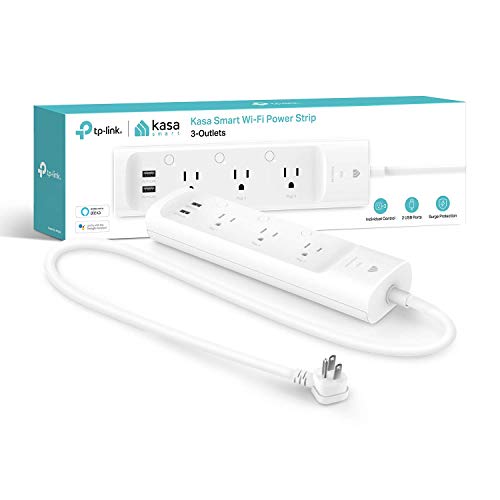
kasa smart Plug Power Strip KP303, Surge Protector with 3 Individually Controlled Smart Outlets and 2 USB Ports, Works with Alexa & Google Home, No Hub Required , White
- Number of Outlets and USB Ports: 3 smart outlets and 2 USB ports
- Voice Control Compatibility: Works with Alexa and Google Assistant
- Surge Protection: ETL-certified surge protection
As an affiliate, we earn on qualifying purchases.
As an affiliate, we earn on qualifying purchases.
Frequently Asked Questions
Can Software Updates Fix the Rebooting Issue?
Yes, software updates can fix the rebooting issue. Firmware fixes often address bugs causing instability, and updates improve compatibility with other devices, reducing crashes. Make sure you download updates from the official source to avoid compatibility issues. Regularly updating your smart switch ensures it runs smoothly, minimizing reboots caused by software glitches. Keep your firmware current to enjoy a more reliable and stable connection.
How Do I Determine if Power Quality Is the Problem?
Think of your switch as a sailor steering stormy seas. To check if power fluctuation or electrical interference causes the reboots, you’ll need a power quality analyzer. Connect it to your circuit and monitor voltage stability over time. Look for sudden dips or spikes, which indicate interference. Additionally, unplug other devices to see if the issue persists, helping you pinpoint if poor power quality is your culprit.
Are There Specific Brands More Prone to Rebooting?
Some brands are more prone to rebooting due to issues with brand reliability and manufacturing defects. Popular brands like TP-Link, Netgear, and Cisco generally have better reputations, but smaller or less established brands may struggle with quality control, increasing reboot risks. Always check reviews and warranty policies, and consider opting for brands known for rigorous manufacturing standards to reduce the chances of random reboots.
What Safety Precautions Should I Take During Troubleshooting?
During troubleshooting procedures, prioritize electrical safety by disconnecting power before handling the smart switch. Wear insulated gloves and use tools with insulated handles to prevent shocks. Avoid working in wet conditions and make sure your hands are dry. Double-check all connections and follow manufacturer instructions carefully. If unsure, consult a professional. Staying cautious minimizes risks and ensures your safety while diagnosing the reboot issues effectively.
Is Professional Inspection Necessary for Persistent Problems?
Did you know that 85% of electrical issues go unnoticed without proper assessment? If your smart switch keeps rebooting, a professional inspection is essential. A qualified technician can perform a power quality assessment to identify underlying problems, such as voltage fluctuations or wiring issues. Skipping this step might lead to further damage or safety hazards. Trust experts to diagnose and resolve persistent problems effectively and safely.

CyberPower ST425 Standby UPS Battery Backup and Surge Protector
- Power Capacity: 425VA/260W standby UPS
- Output Waveform: Simulated sine wave output
- Outlets: 8 NEMA 5-15R outlets
As an affiliate, we earn on qualifying purchases.
As an affiliate, we earn on qualifying purchases.
Conclusion
When your smart switch keeps rebooting, it’s like a lighthouse flickering in a storm—your power quality is struggling to steady the course. By checking your wiring, ensuring stable power, and consulting experts, you can restore calm to your system. Don’t let erratic reboots be the storm that blinds your control; instead, see them as signals guiding you toward better stability. Fixing power issues isn’t just repair—it’s restoring harmony in your home’s digital symphony.

Kasa Smart 3-Way Dimmer Switch Kit, KS230 KIT v2, Need Neutral Wire
- 3-Way Smart Dimmer Switch: Replaces traditional 3-way switches
- Dimming Range: Adjust brightness from 1% to 100%
- Scheduling Feature: Set lights to turn on/off automatically
As an affiliate, we earn on qualifying purchases.
As an affiliate, we earn on qualifying purchases.
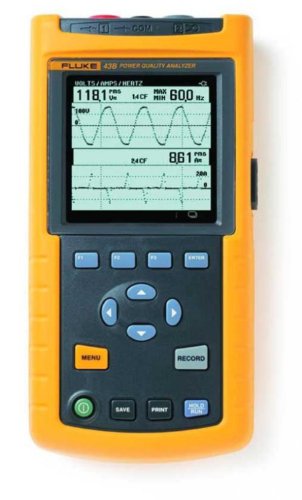
Fluke 43B/003 Power Quality Analyzer
- Pre-shipment Calibration: Includes NIST-traceable calibration certificate
- Quality Assurance: Meets manufacturer specifications for immediate use
- Power Calculation: Calculates 3-phase power from single-phase data
As an affiliate, we earn on qualifying purchases.
As an affiliate, we earn on qualifying purchases.